
Compressor Controller Hardware for Dealership Air Systems
Connect compressor hardware to live command-center visibility, controlled settings, diagnostics, maintenance workflows, vendor dispatch, and audit-ready evidence in F2 Core.
Pressure / flow / demand signals
Runtime and starts visibility
Lead / lag and sequencing support
Alarm output to workflows
Service-ready records
Hardware that turns compressed-air signals into work
Compressor signals should not stop at the controller. In F2 Core, they become alerts, tickets, maintenance actions, vendor workflows, service records, and audit evidence.
What F2 Core captures from the compressor.
Pressure, flow, demand, runtime, starts
CT current readings and I/O states
Controller status, faults, warnings
Alarm outputs and event logs
Maintenance intervals
How F2 Core routes the work.
Command modes and controlled settings
Alert acknowledgments and tickets
Work orders and PM triggers
Service scheduling and vendor dispatch
Diagnostics export and approvals
How the operating record keeps proof.
Pressure and flow trends
Event history and audit logs
Before / after values, user actions
Maintenance records and system checks
Closeout records and vendor notes
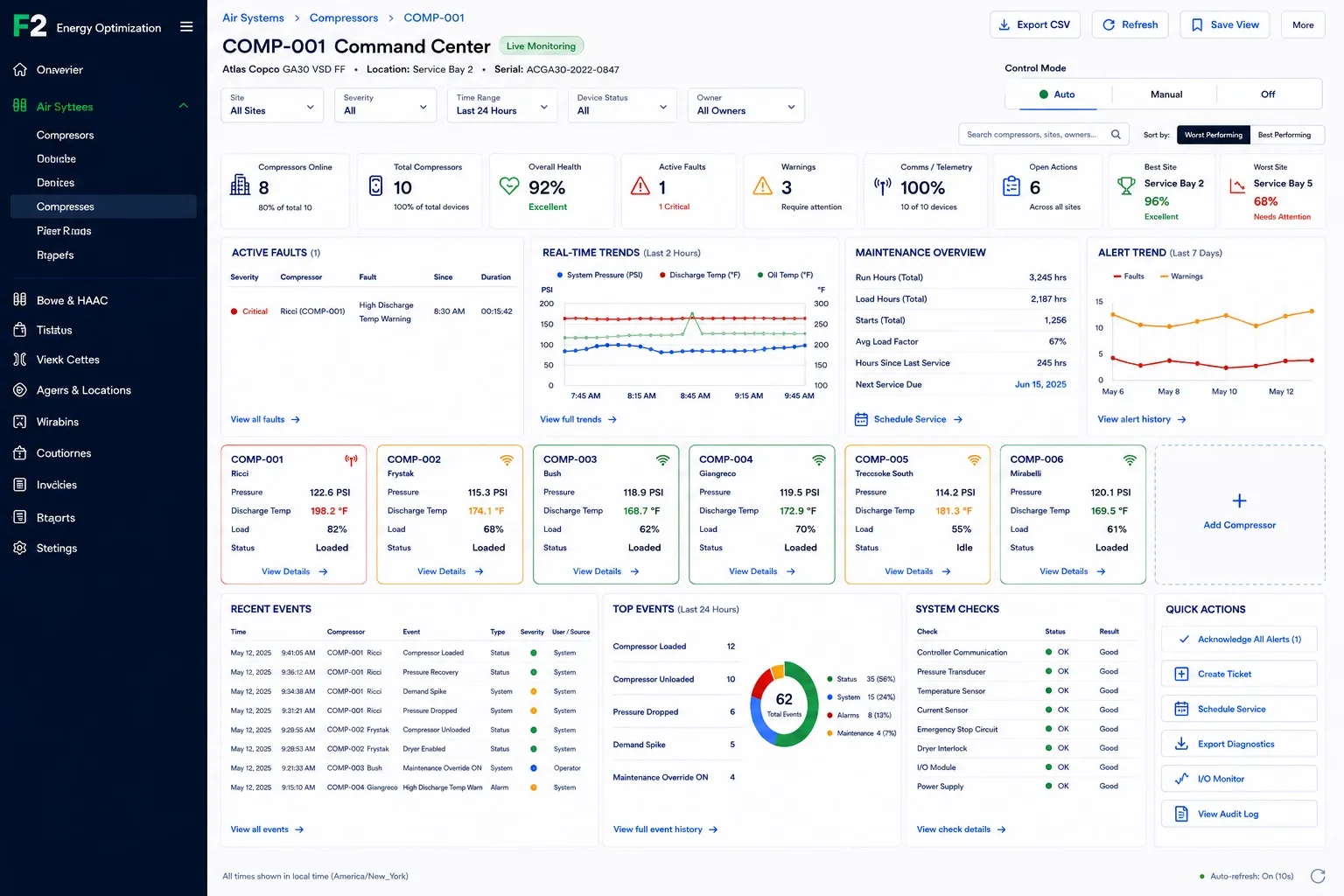
Compressor Logic Command Center
A command center for dealership air systems. Review compressor health, faults, warnings, telemetry, maintenance, trends, recent events, top events, site performance, and supported command actions across units and locations.
Use the Command Center to review compressor status across units and locations, then move from signal to action without leaving the dealership operating layer.
Multi-compressor command center
Review compressor cards by unit and site — pressure, discharge temperature, load, status, and location.
Online and communication status
See which compressors are online, connected, and communicating.
Health, faults, and warnings
Review overall health, active faults, warnings, severity, and site-level status.
Real-time trends
Track system pressure, discharge temperature, and oil temperature over time.
Maintenance overview
View run hours, load hours, starts, average load factor, hours since last service, and next service due.
Alert trends
See how faults and warnings are changing across recent days.
Best and worst site visibility
Surface locations that are performing well and locations that need attention.
Quick actions
Acknowledge alerts, create tickets, schedule service, export diagnostics, open I/O monitor, view audit log.
Live device screens for every compressor
Open a compressor in F2 Core and review running state, pressure, flow, demand, I/O, settings, diagnostics, maintenance, events, and audit history in one controlled workspace. Mandatory order — never reorder.
Overview
Live compressor status without walking to the controller — running/loaded/auto mode, system pressure, air flow, air demand, pressure and flow trends, run summary, key parameters, maintenance, active alarms, and quick actions.
- Running / loaded / auto mode status
- System pressure, air flow, air demand
- Pressure and flow trends
- Run summary: total run time, loaded run time, starts
- Active alarms and maintenance status
- Supported quick actions
Live compressor overview showing running status, pressure, flow, demand, run summary, trends, key parameters, maintenance, alarms, and supported quick actions.
Dealership-safe compressor logic with audit-tracked control
Technician-friendly compressor logic for dealership air systems with authorized command workflows and audit-tracked changes.
Lead / lag sequencing
Compressor rotation, lag assignment, start delay between units, and equal runtime workflows for supported configurations.
Pressure setpoint management
Review and manage supported start, stop, minimum, maximum, unload pressure, and demand peak threshold.
Control mode visibility
Auto, Manual, and Off mode visibility with role-based command workflows.
Dryer and demand logic
Dryer interlock, dryer enable state, demand peak trigger, and related I/O visibility.
Alarm rules and notifications
Manage supported high pressure, high temperature, low oil pressure, audible alarm, beacon, email, SMS, and notification delay.
Maintenance override and service timing
Maintenance override timeout, run hours, load hours, starts, hours since last service, and next service due.
Commissioned for shop-critical systems
Compressed air is essential to service operations, so installation and commissioning should be handled with clear procedures and qualified partners.
Authorized installers complete site review, controller setup, signal validation, fallback planning, and handoff records before the system becomes part of the operating workflow.
Site review — assets, controller requirements, signal points, service workflow needs.
Controller setup — controller connections, compressor records, site association, command permissions, workflow routing.
Signal validation — pressure, flow, runtime, I/O, alarm, status, and communication signals before handoff.
Fallback planning — how the compressor system should continue to operate if connectivity or control is interrupted.
Handoff record — commissioning notes, installer details, signal validation, settings baseline, and service contacts on the asset record.
From compressor signal to service-ready record
Hardware signals route to F2 Core for maintenance, tickets, vendor dispatch, approvals, and closeout records.
PM trigger
Run hours, service intervals, warnings, or threshold events can create planned maintenance tasks and service reminders.
Ticket or work order
Pressure issues, compressor warnings, excessive starts, or service-due signals can become trackable work.
Vendor dispatch
Service partners can receive signal history, diagnostics, event context, and maintenance records before arriving on site.
Approval routing
Larger repairs or replacements can move through quote comparison, approval thresholds, committed cost, and invoice matching.
Service evidence
Closeout updates the compressor asset with service notes, documents, timestamps, follow-up dates, and future recommendations.
Built for dealership operations, not generic equipment monitoring
F2 Core is designed around the way dealership teams actually work: service bays, facility assets, vendors, tickets, work orders, approvals, inspections, maintenance, and evidence.
Dealer principals
Visibility into a critical facility system that supports fixed operations.
Fixed operations leaders
Standardize compressor response across rooftops, service departments, and facility teams.
Service directors
Understand whether compressed-air issues may affect service-bay productivity, tools, and equipment.
Facility managers
Review pressure, flow, demand, runtime, starts, alarms, I/O states, settings, maintenance, diagnostics, and events in one workspace.
Corporate operations teams
Compare sites, review trends, track audit evidence, and create a repeatable operating model across the group.
Vendors and service partners
Use diagnostics, event history, warnings, and system checks to arrive with better context.
Energy Management features help identify runtime patterns, exceptions, and opportunities for action. Actual savings depend on site conditions, equipment, usage, tariffs, and implementation.
Compressor Controller FAQ
No. F2 Core Compressor Controller supports visibility, controlled settings, command workflows, diagnostics, event history, audit logs, maintenance workflows, and service handoff for supported dealership compressed-air systems.
Yes. The Command Center is designed for multi-compressor and multi-site dealership operations, including compressor cards, site health, faults, warnings, maintenance, trends, and quick actions.
The interface includes control mode visibility for Auto, Manual, and Off, with authorized command workflows for supported configurations.
Yes. The Audit Log shows user, action, module, details, old value, new value, timestamp, and IP address where available.
The settings workflow supports lead compressor, lag compressors, start delay between units, rotation interval, and equal runtime concepts for supported configurations.
No. F2 Core is positioned as a visibility, command workflow, service, and evidence layer for supported systems. Existing compressor safeguards, OEM requirements, and qualified installation procedures still apply.
Installation should be handled by authorized installers or qualified professionals who complete site review, controller setup, signal validation, fallback planning, and handoff records.
Yes. Compressor alerts, warnings, runtime exceptions, and service-due conditions can connect to dealership workflows such as tickets, work orders, service scheduling, vendor dispatch, acknowledgments, and records.
Lead time, installer coverage, and pricing
Procurement details are quoted directly so they reflect your region, rooftop count, and integration scope.
Procurement FAQ — Compressor Controller
Hardware carries a 12-month manufacturer warranty from the install completion date. Extended terms are available through authorized partners on a per-quote basis.
Hardware is supported for a minimum of 5 years from purchase. After end-of-life, replacement and upgrade paths are offered through the same authorized partner network.
F2 maintains a directory of authorized installers by region. If your original installer becomes unavailable, we route service requests to the next available authorized partner.
Annual service contracts are quoted alongside the install. They cover firmware updates, calibration, and labor for in-warranty issues.
Common consumables and replacement parts are stocked by the authorized installer network. Lead times for specialty parts are quoted on request.
Ready to connect compressor hardware to dealership workflow?
Walk through compressor controller hardware, command-center visibility, device screens, service workflows, vendor handoff, and audit-ready records.
Compressor Logic Command Center for dealership air systems.
Schedule Compressor Demo