
Pelican HVAC management for service-bay readiness.
F2 Core brings Pelican site, thermostat, schedule, notification, usage, and report data into an operating view so dealership groups can spot HVAC exceptions, route action, and keep every service area ready.
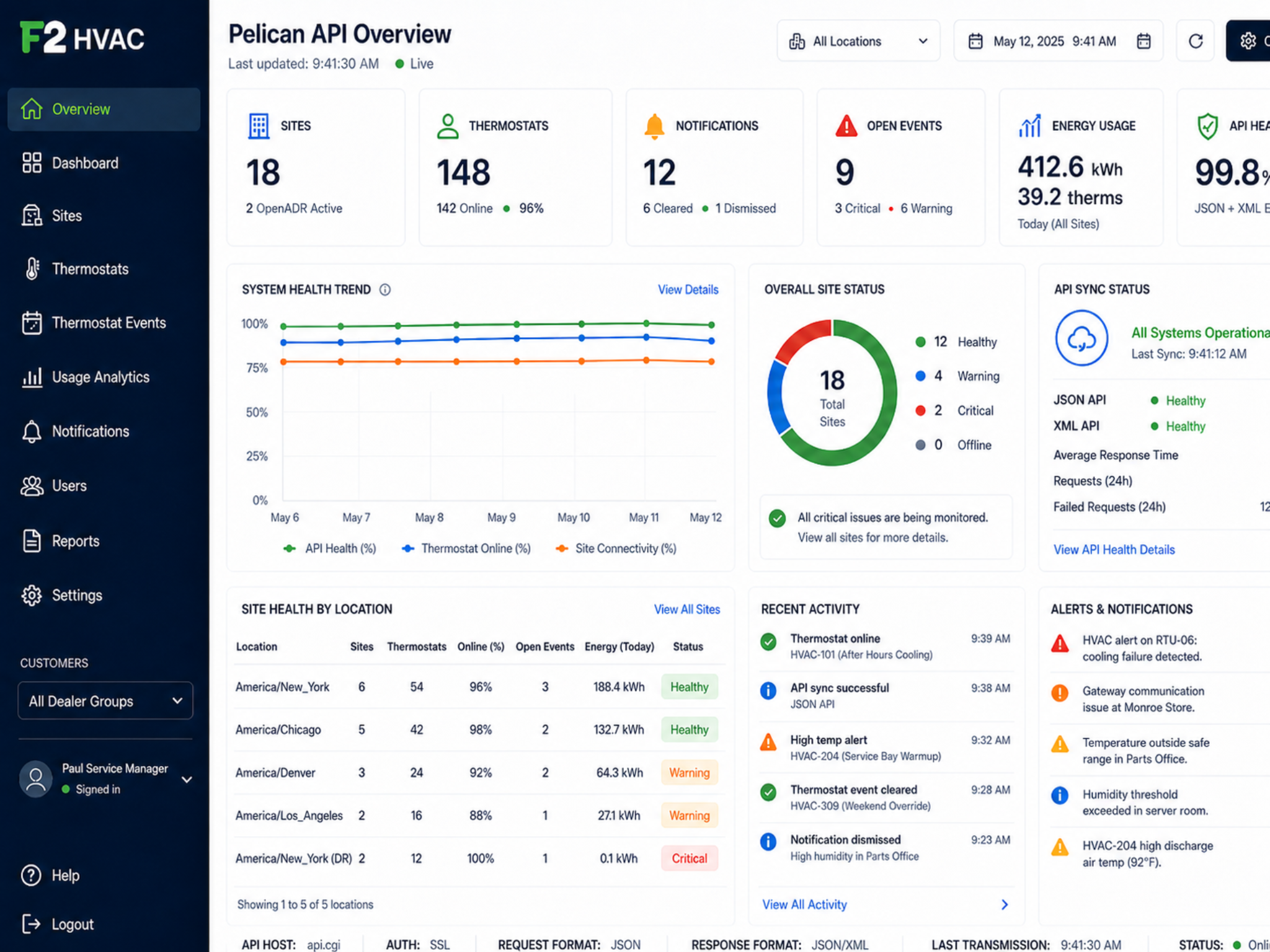
18-site rollups
Thermostat inventory
Event schedules
Notifications
Usage cost analysis
API health
Multi-site HVAC visibility
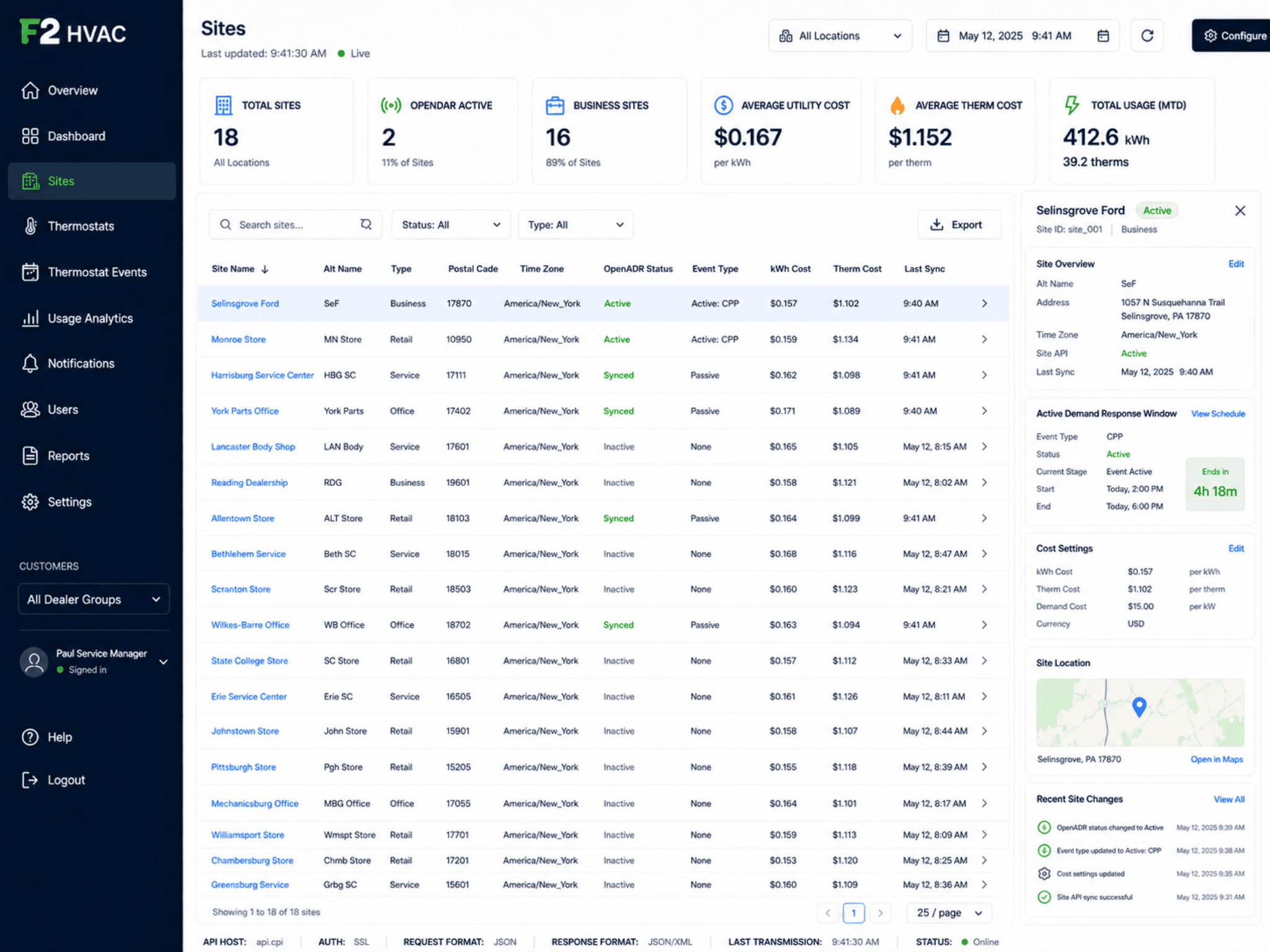
See site status, OpenADR demand response state, device counts, utility cost settings, and active issues by location across every rooftop.
Site status rollup
Healthy, warning, and critical status for every dealership location in one view.
OpenADR awareness
See which sites are active, synced, or passive in demand response programs.
Device counts and online %
Thermostats and gateways online vs offline at each site.
Utility cost settings
Per-site kWh and therm cost settings power the cost analysis downstream.
Thermostat inventory and selected-unit context
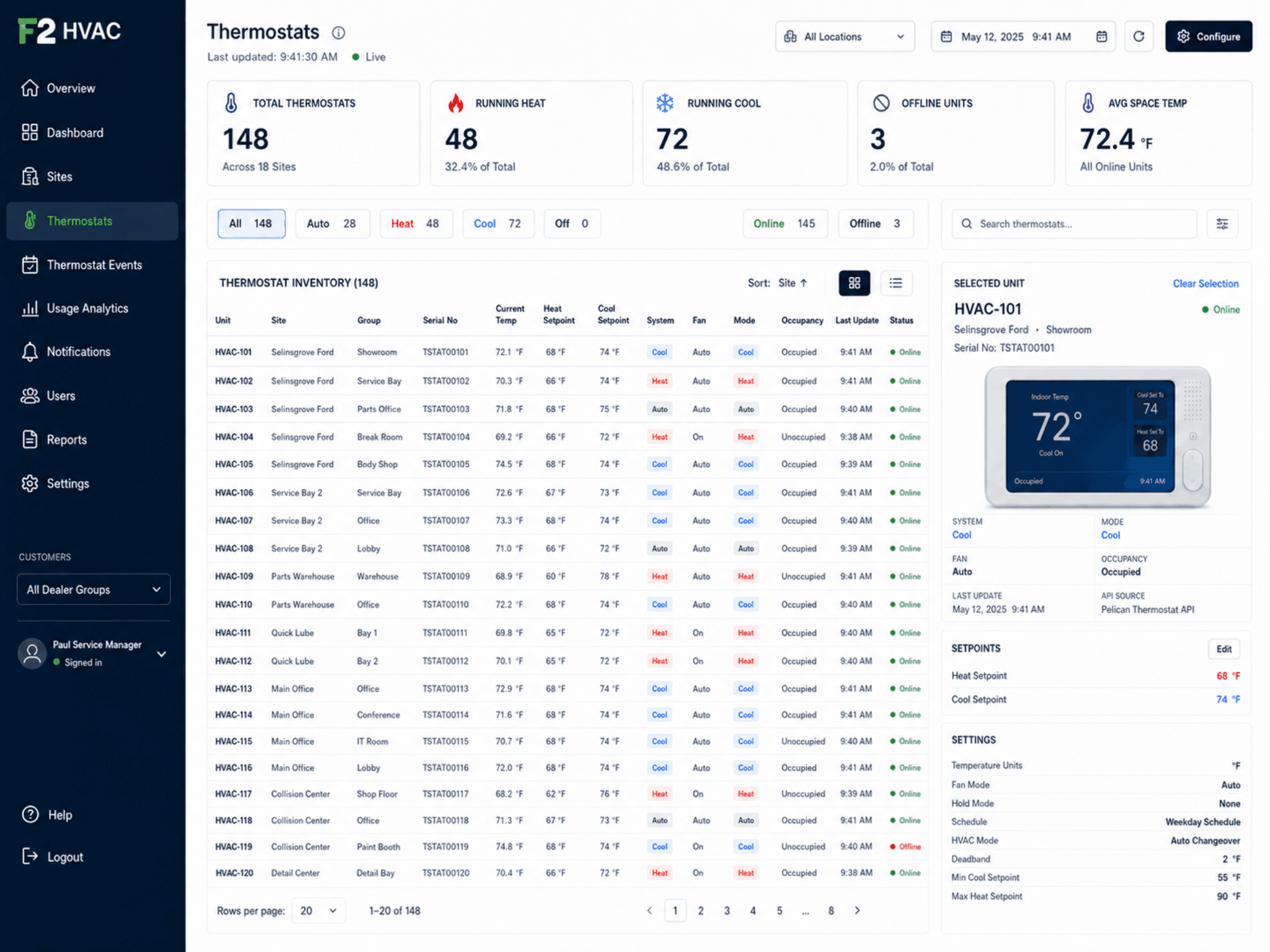
Drill from the portfolio into a specific thermostat to see current temperature, setpoints, system mode, fan, occupancy, and online status.
Current state at a glance
Temp, heat/cool setpoint, system mode, fan, and occupancy per unit.
Online / offline status
Spot units that are offline before a comfort issue surfaces.
Selected unit detail
Click into a thermostat to see schedule, history, and recent events.
Group and serial filters
Filter by site, group, serial, system, run status, or occupancy.
Event schedules and controlled overrides
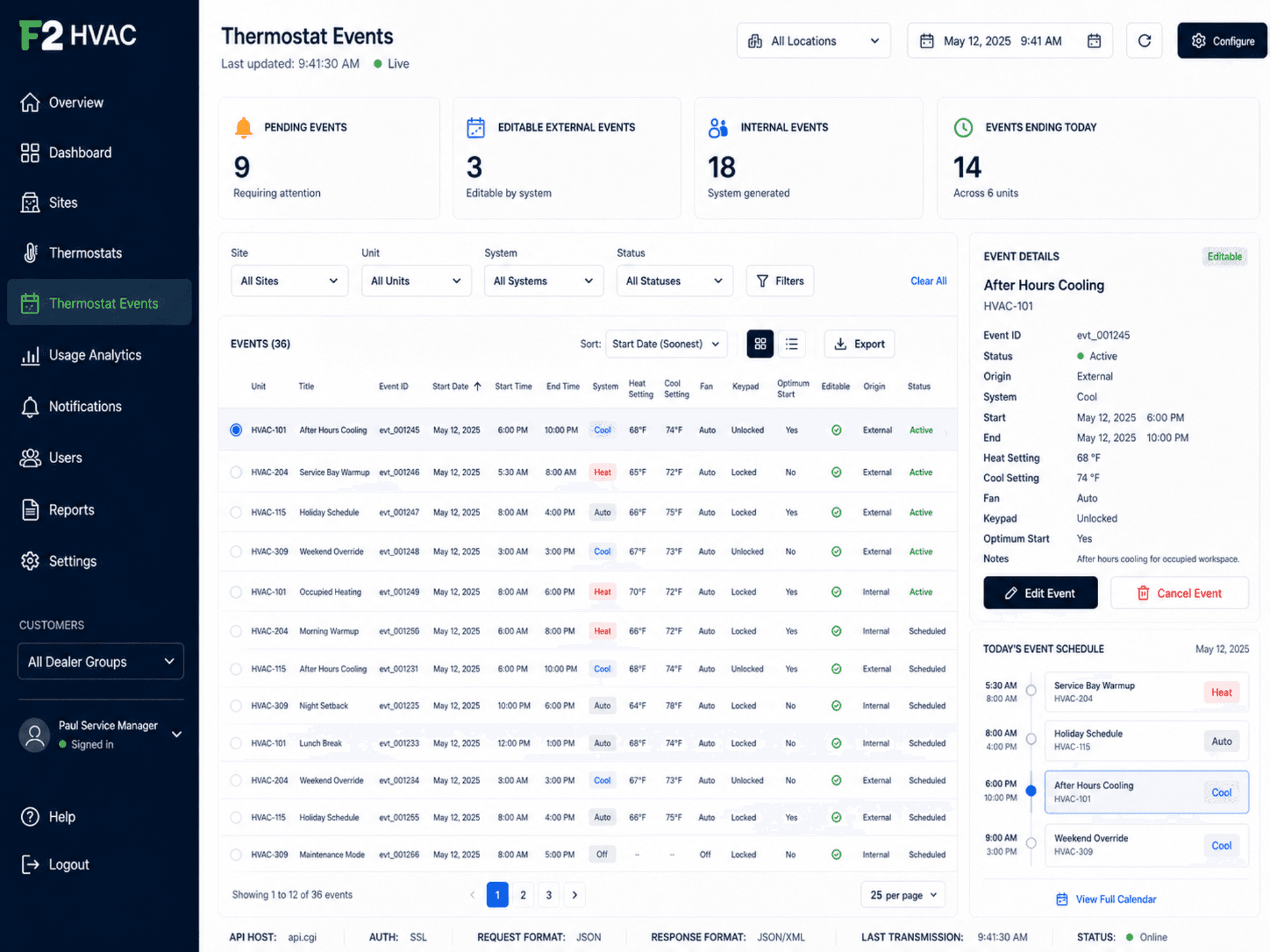
Review current and pending thermostat events, where they originated, and which ones are externally editable.
Current and pending events
Active events plus what is scheduled next so after-hours behavior is visible early.
Origin and editability
External vs internal origin and whether the event is externally editable.
Setpoints and fan/keypad
Heat, cool, fan, keypad lock, and optimum start captured per event.
Status tracking
Active, scheduled, ending today — flag events that need an owner.
Notifications and escalations
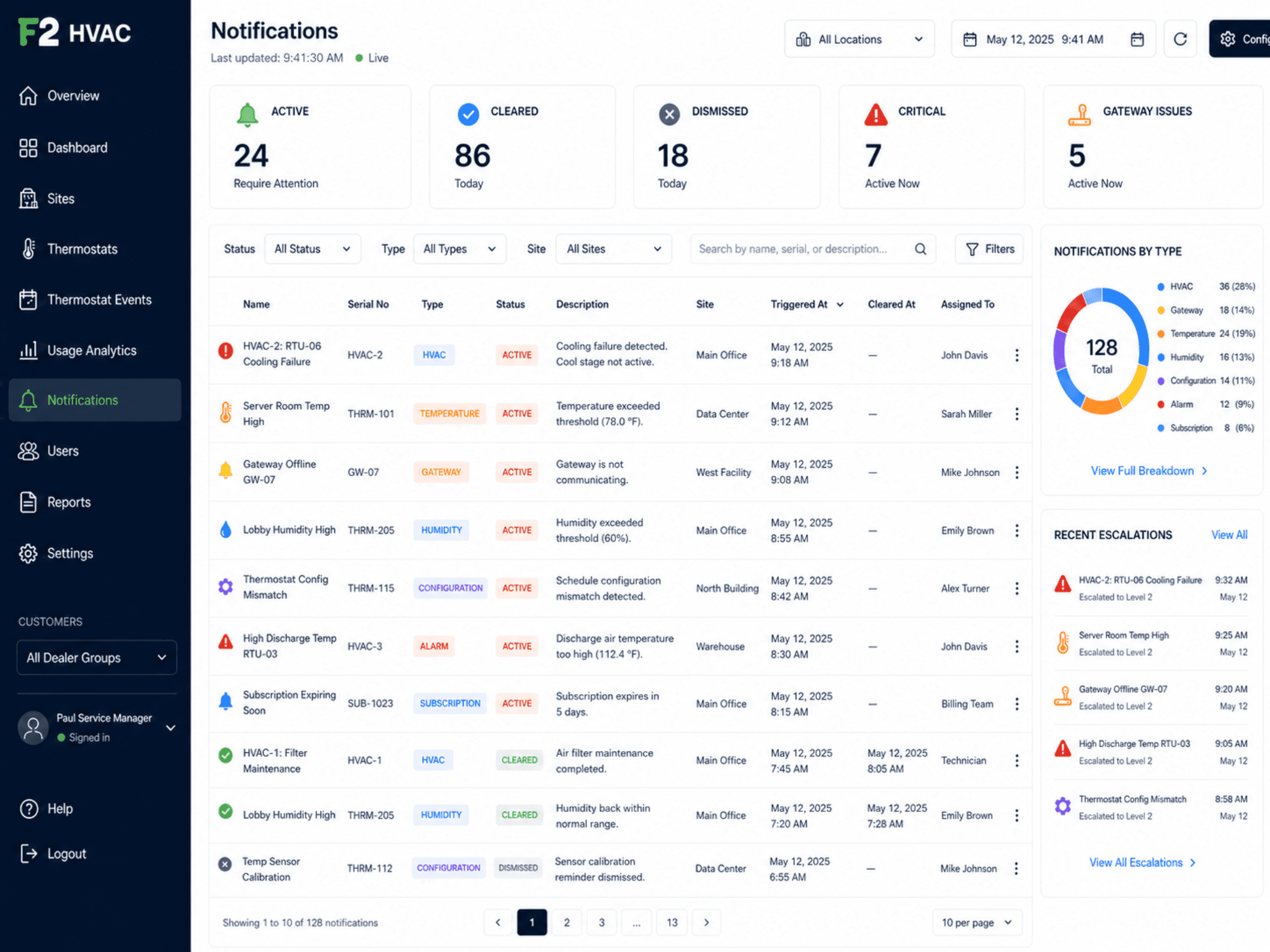
Active, cleared, and dismissed notifications with type breakdown, assigned owner, and recent escalations.
Active vs cleared
Separate what needs action now from what has already been handled.
Critical and gateway issues
Surface critical conditions and gateway connectivity issues without waiting for the bill.
Type breakdown
HVAC, gateway, temperature, humidity, configuration, alarm, and subscription.
Assigned owner
Each notification carries an assigned owner and a recent escalation history.
Usage analytics and runtime cost context
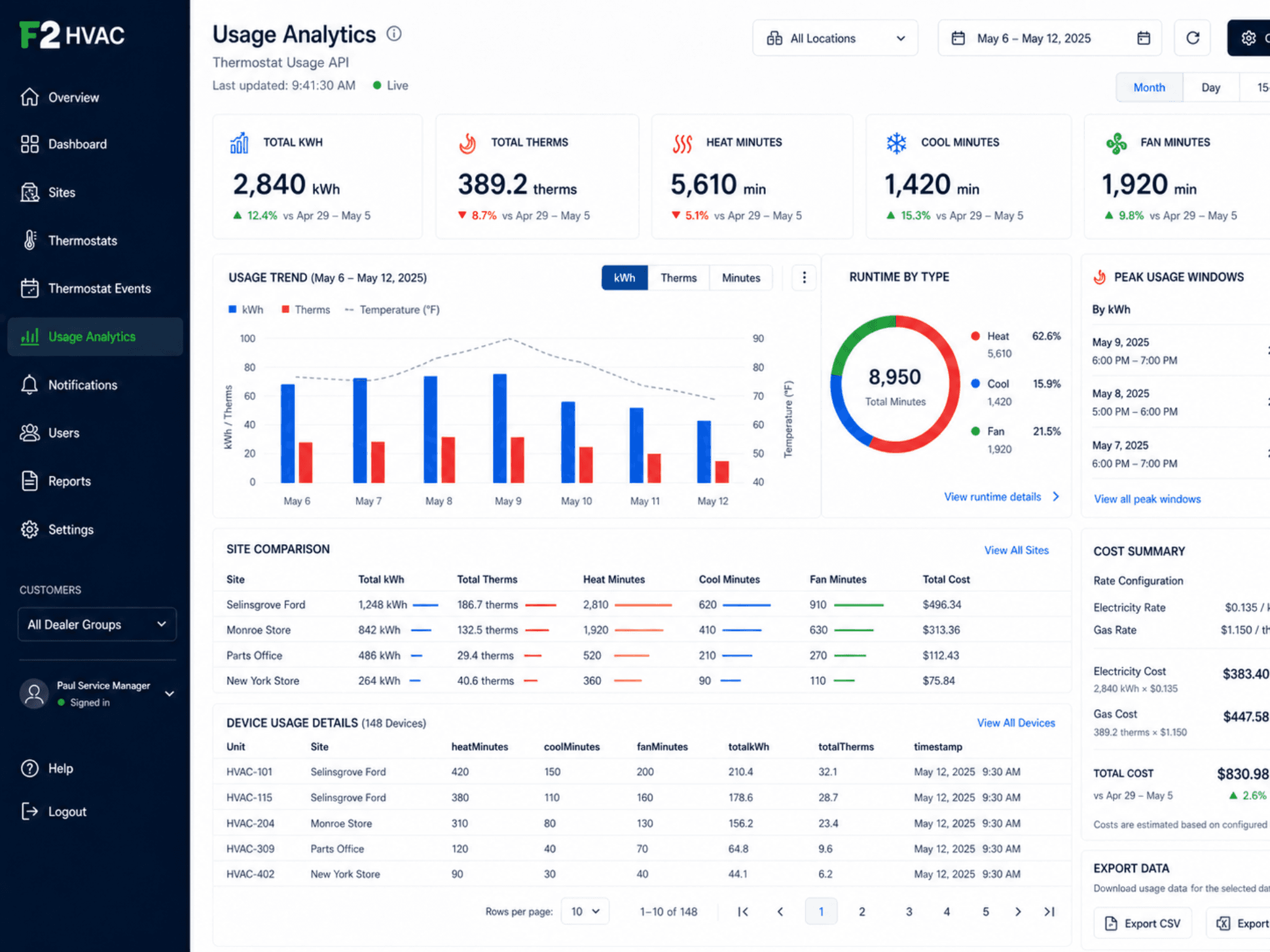
Energy and runtime analysis by site and device — heat, cool, and fan minutes; kWh, therms, and calculated cost using site cost settings.
Compare sites, drill into device usage, and export for monthly review. Use this data to identify runtime patterns and exceptions worth investigating.
kWh, therms, heat/cool/fan minutes
Runtime by type and peak windows
Site comparison and device drill-in
Export to PDF, CSV, or JSON
Energy savings note
Energy Management features help identify runtime patterns, exceptions, and opportunities for action. Actual savings depend on site conditions, equipment, usage, tariffs, and implementation.
Operational reports for HVAC follow-through
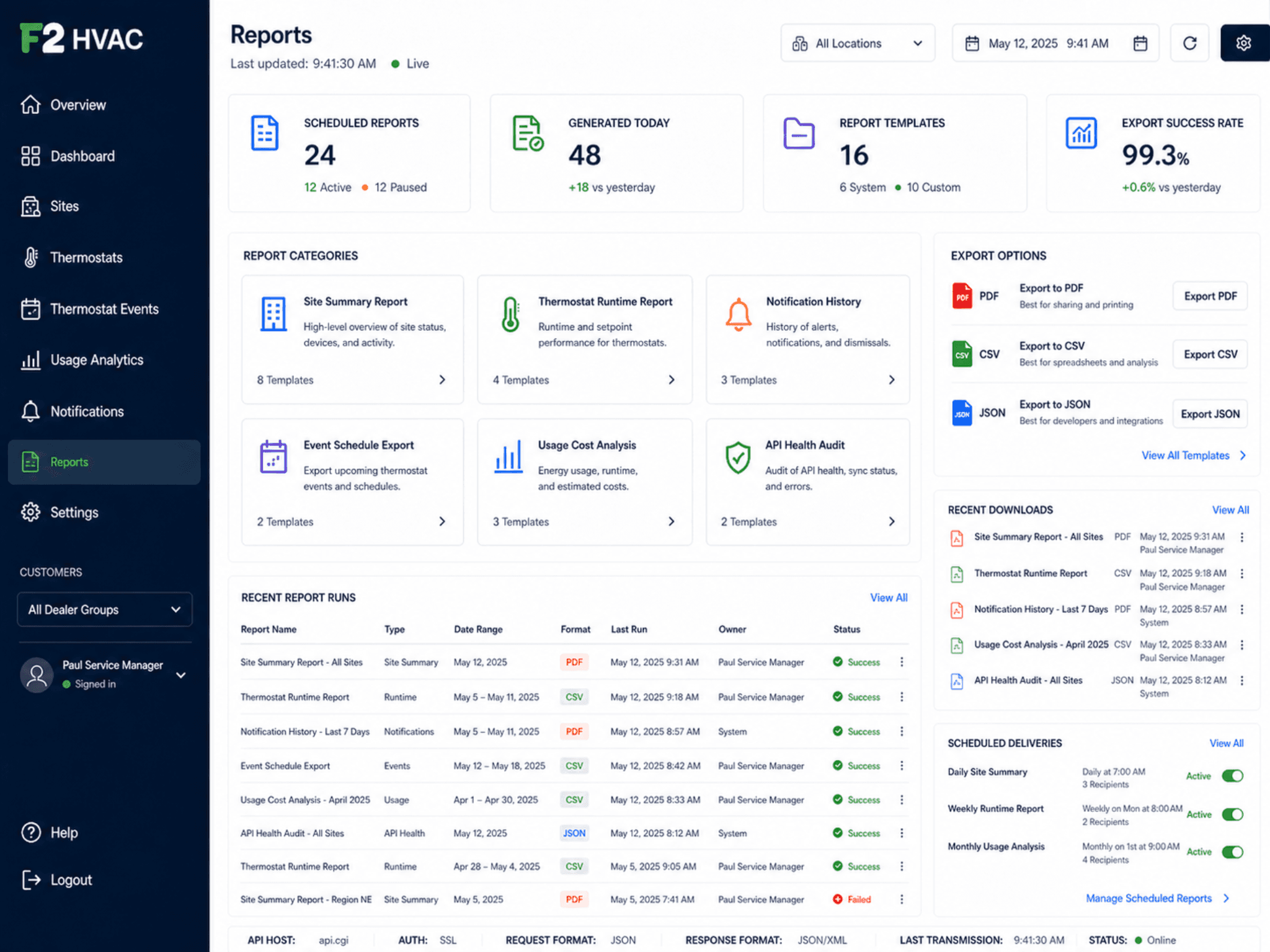
Scheduled and on-demand reports mirror the Pelican menu categories — site summary, thermostat runtime, notification history, event schedules, usage cost, and API health.
Scheduled deliveries
Daily site summary, weekly runtime, monthly usage, on-demand notification digests.
Export formats
PDF for executives, CSV for spreadsheets, JSON for downstream systems.
Shared filters
Locations, dealer group, site, date/time picker, and object-specific status filters.
Recent downloads
See what was generated and by whom for audit trail context.
API health and integration confidence
The Pelican integration is monitored for SSL, request/response encoding, response time, failed-request rate, and data freshness — without exposing credentials on public surfaces.
SSL and authentication
SSL connection required; certificate expiry monitored.
Request/response format
JSON request and JSON or XML response monitored for parser errors.
Response time and freshness
Average response time and last-transmission age tracked daily.
Failed request rate
Failed requests tracked against an expected error-rate threshold.
Door-open and operating context
Dealerships have special HVAC challenges: service doors, open bays, showroom comfort, and variable traffic.
Door-open interruption logic
Recognize when service-door activity affects HVAC behavior.
Service drive context
Service drive zones with schedule and runtime patterns.
After-hours exceptions
After-hours runtime surfaced as exceptions, not buried in bills.
Work order creation
Comfort and runtime issues route into tickets and work orders.
Service vendor workflow
When an HVAC issue needs service, F2 Core carries the site, thermostat, schedule, comfort notes, runtime history, and urgency into the vendor request.
Vendor dispatch
Send vendors the right context to respond faster.
Quote and approval
Quote intake and approval routing tied to the work.
Service closeout
Closeout evidence retained on the asset.
Documented history
Past service records, recurring issues, repair-vs-replace signal.
Lead time, installer coverage, and pricing
Procurement details are quoted directly so they reflect your region, rooftop count, and integration scope.
Procurement FAQ — Pelican HVAC
Hardware carries a 12-month manufacturer warranty from the install completion date. Extended terms are available through authorized partners on a per-quote basis.
Hardware is supported for a minimum of 5 years from purchase. After end-of-life, replacement and upgrade paths are offered through the same authorized partner network.
F2 maintains a directory of authorized installers by region. If your original installer becomes unavailable, we route service requests to the next available authorized partner.
Annual service contracts are quoted alongside the install. They cover firmware updates, calibration, and labor for in-warranty issues.
Common consumables and replacement parts are stocked by the authorized installer network. Lead times for specialty parts are quoted on request.
Turn HVAC signals into work, not after-hours surprises.
Walk through Pelican HVAC dashboards, schedules, and vendor workflows using a real dealer-group use case.